WiFi QR code generator

Make a QR code guests scan to join your WiFi. Print it as a ready-made sign for your rental. Free, no sign-up, and your password never leaves your browser.

How it works

  1. Step 1

    Type your network details

    Use the exact network name your router shows. Capital letters count.

  2. Step 2

    Check the sign

    Add a title like Welcome to Mount Lee Cottage if you like, and choose whether the password is printed too.

  3. Step 3

    Print or download

    Print the sign, or download a PNG or SVG for your welcome book or a frame.

Made for rentals

Your password stays with you

The code is made in your browser. Your network name and password are never sent to us.

A sign, not just a code

You get a finished sign with your network name on it, ready for the fridge or the welcome book.

Works with the phone camera

iPhones and most Android phones join straight from the camera. Guests install nothing.

Guests ask about more than the WiFi

HelloGuestbook puts this QR code in a digital guidebook, next to check-in, house rules and your local tips. Guests open one link on their phone.
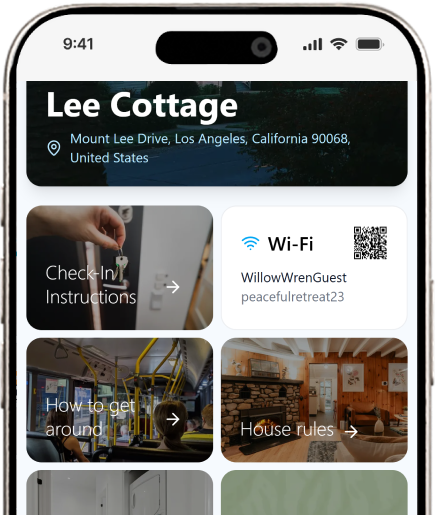
HelloGuestbook wifi page showing a QR code and a text field with wifi password and wifi name

Questions about WiFi QR codes

Something else? Ask us on the contact page.

What is a WiFi QR code?
A WiFi QR code holds your network name, password and security type. When a guest points their phone camera at it, the phone offers to join the network. Nobody has to type the password.
Is this WiFi QR code generator free?
Yes. There is no sign-up and no limit. Print or download as many signs as you like.
Is my WiFi password safe?
The QR code is made in your browser. Your network name and password are not sent to us or stored anywhere.
Which phones can scan a WiFi QR code?
iPhones on iOS 11 or later and most Android phones from Android 10 join straight from the camera. On older Android phones, Google Lens reads the code.
Can guests join from a QR code on their own screen?
Yes, on most newer phones. On an iPhone, press and hold the QR code to get the option to join the network. On Android, take a screenshot and scan it with Google Lens or the scan option in your photo gallery. The WiFi card in a HelloGuestbook guidebook tells guests the same thing.
Does the QR code stop working?
No. It works until you change your network name or password. Then make a new sign.
Which security type should I choose?
WPA / WPA2 / WPA3 fits almost every home router. Pick WEP only for a very old router, and None for an open network.
Should I print the password on the sign too?
It helps guests on a laptop or an older phone, who can type it in. It is on by default, and you can turn it off.
Does leaving the password off the sign keep it secret?
No. The QR code holds the password, and any phone or QR reader app can show it. Leaving it off only makes the sign tidier. To keep your own network private, give guests a separate guest network.